10 Best 160hz Ips Computer Monitor Of 2026
160hz Ips Computer Monitor — Reviews, Recommendations & Updated Buying Guide November 2026


GIGABYTE G27U Gaming Monitor 27" 4K UHD
Why We Love It


Vision Forge V1 32 Inch 4K 160Hz Gaming Monitor
Why We Love It
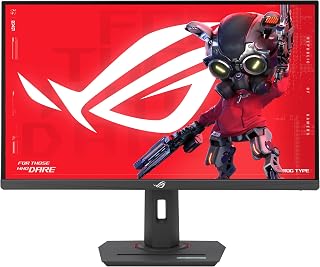
ASUS ROG Strix XG27UCS USB Type-C Gaming Monitor: 27-inch 4K
Why We Love It

Vision Forge V1 27 Inch Dual Mode Gaming Monitor
Why We Love It

LG Ultragear 34G600A-B.AEU 34-Inch Gaming Monitor
Why We Love It

AOC 32 inch 4K Gaming Monitor
Why We Love It

Gigabyte GS27U 27" UHD Gaming Monitor - 3840 x 2160
Why We Love It

Gigabyte Monitor M27UP ICE 27 inch UHD Gaming
Why We Love It

Gigabyte M27UP 27” 4K UHD Gaming Monitor
Why We Love It
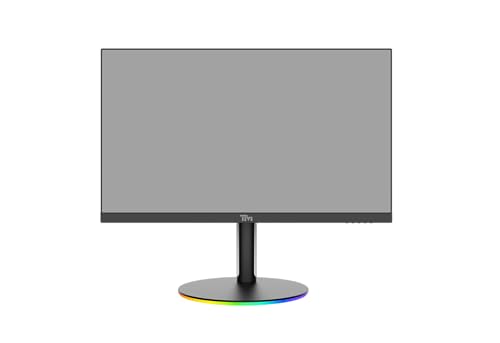
Twisted Minds 27 Inch 4K Gaming Monitor UHD 3840x2160 160Hz
Why We Love It
Quick Pick
10 Best 160hz Ips Computer Monitor Of 2026
Quick Pick
GIGABYTE G27U Gaming Monitor 27" 4K UHD - Dual Mode (4K 160Hz or FHD 320Hz), 3840x2160, 1ms, 350CD/m², FreeSync Premium, DisplayHDR400, HDMI 2.1, DisplayPort 1.4
Vision Forge V1 32 Inch 4K 160Hz Gaming Monitor, Fast IPS, 1ms Response Time, HDR, AMD FreeSync, HDMI 2.1, 450 nits, 5W Speakers, VRR, ALLM, VESA Mount
ASUS ROG Strix XG27UCS USB Type-C Gaming Monitor: 27-inch 4K UHD (3840x2160), 160Hz (Above 144Hz), 1ms (GTG), Fast IPS, Extreme Low Motion Blur Sync, USB Type-C, G-Sync compatible - Black
Vision Forge V1 27 Inch Dual Mode Gaming Monitor, 4K 160Hz and FHD 320Hz, Fast IPS, 0.5ms MPRT, HDR, FreeSync, HDMI 2.1, USB-C 90W, VRR, ALLM, 5W Speakers
LG Ultragear 34G600A-B.AEU 34-Inch Gaming Monitor - VA Panel QHD (3440 x 1440), 5ms GtG 160Hz, HDR 10, sRGB 99% (CIE1931), FreeSync Premium
AOC 32 inch 4K Gaming Monitor, UHD 3840×2160 160Hz / FHD 320Hz Dual Mode, IPS Panel, 0.5ms MPRT, HDMI 2.1, DisplayPort 1.4, G-Sync Compatible, Height Adjustable Stand, U32G4 | 3840×2160 Computer Monitor, 4K 160Hz / FHD 320Hz, 0.5ms / 0.3ms, HDR, HDMI 2.1, DP 1.4, Height Adjustable, Earphone Out, VESA
Gigabyte GS27U 27" UHD Gaming Monitor - 3840 x 2160, 160Hz, 1ms, 350 cd/m², Display HDR400, HDMI 2.1, Displayport 1.4
Gigabyte Monitor M27UP ICE 27 inch UHD Gaming
Gigabyte M27UP 27” 4K UHD Gaming Monitor - Dual Mode (4K 160Hz or FHD 320Hz), 3840 x 2160, 1ms, 350 cd/m², FreeSync Premium, DisplayHDR400, HDMI 2.1, Displayport 1.4
Twisted Minds 27 Inch 4K Gaming Monitor UHD 3840x2160 160Hz, Quantum Dot Fast IPS, 0.5ms MPRT, HDR10, 95% DCI-P3, 119% sRGB, Dual HDMI 2.1, G-Sync & FreeSync, Speakers, Console Ready, Black TMDX27B
Buying Guide: 160hz Ips Computer Monitor
📋 Table of Contents
1What resolution should I look for in a 160Hz IPS computer monitor?
For a 160Hz IPS monitor, 1080p (Full HD) is suitable for casual use, but 1440p (QHD) or 2K offers sharper visuals for gaming and content creation. 4K models exist but may strain the GPU and reduce refresh rate effectiveness at lower settings.
2Is a 160Hz IPS monitor better for gaming or productivity?
A 160Hz IPS monitor excels in gaming due to its high refresh rate and wide color gamut, reducing motion blur and improving responsiveness. For productivity, it’s great too, offering accurate colors and wide viewing angles, ideal for video editing or graphic design.
3What panel size is best for a 160Hz IPS monitor?
24- to 27-inch sizes are popular for gaming and multitasking, balancing screen real estate and desk space. Larger 32-inch models are better for media consumption or dual-monitor setups, but may require a more powerful GPU for high-resolution gaming.
4Should I prioritize response time over refresh rate on a 160Hz IPS monitor?
Yes — look for a 1ms response time (GTG) to minimize ghosting, especially in fast-paced games. While 160Hz ensures smooth motion, a slow response time can cause motion blur, so both specs are critical for a competitive edge.
5What kind of connectivity ports should I expect on a 160Hz IPS monitor?
Most 160Hz IPS monitors include HDMI 2.0 or higher, DisplayPort 1.4, and USB-C for versatile connectivity. Look for models with multiple HDMI and DisplayPort inputs if you plan to use multiple devices or high-resolution setups.
How we choose
Our editors are people who genuinely love testing and writing about products. We compare each product's real-world usability and strengths, then distill what matters most into our own "Why We Love It" points — so you get an honest, at-a-glance sense of what counts before you buy.