10 Best 144hz Monitor For Developer Of 2026
144hz Monitor For Developer — Reviews, Recommendations & Updated Buying Guide November 2026


KOORUI E2411H 23.8 inch Monitor Full HD
Why We Love It

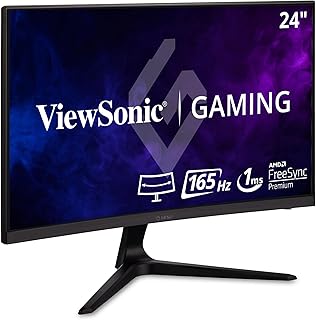
Viewsonic Omni VX2418C 24 Inch 1080p 1ms 165Hz Curved Gaming
Why We Love It

KOORUI 27 Inch Monitor FHD 1080P 144Hz Computer Monitor IPS
Why We Love It
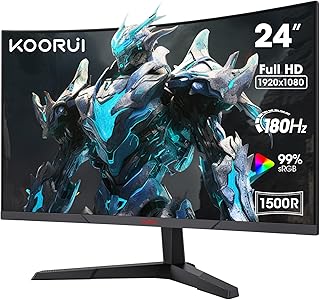
KOORUI 24 Inch Gaming Monitor -FHD 1080P Curved Monitor
Why We Love It

KOORUI monitor MY-GN06-US3 27 Inch Gaming Monitor
Why We Love It

KOORUI E2212F 22 Zoll Monitor Full-HD
Why We Love It

Lenovo L24-4C Monitor | 23.8" FHD
Why We Love It

BenQ EX3203R 32 Inch 1800R Curved Gaming Monitor QHD 2K HDR
Why We Love It

AOC 24 Inch Gaming Monitor FHD 144Hz Fast IPS 0.5ms HDR
Why We Love It

Viewsonic VX2758-2KP-MHD
Why We Love It
Quick Pick
10 Best 144hz Monitor For Developer Of 2026
Quick Pick
KOORUI E2411H 23.8 inch Monitor Full HD, 120 Hz, 5ms, Eye Comfort, sRGB% 99 Farbumfangs, (1920 x 1080, HDMI, VGA, Neigbar, VESA 75x75)
Viewsonic Omni VX2418C 24 Inch 1080p 1ms 165Hz Curved Gaming Monitor with AMD FreeSync Premium, Eye Care, HDMI and DisplayPort
KOORUI 27 Inch Monitor FHD 1080P 144Hz Computer Monitor IPS Display 1500:1 Contrast Ratio with HDMI VGA, Three-Sided Slim Bezels, Freesync, 100 x 100 mm VESA Mountable, Ergonomic Tilt, Black
KOORUI 24 Inch Gaming Monitor -FHD 1080P Curved Monitor 165Hz VA 1ms 1500R PC Monitors with Adaptive Sync, HDMI X2 /DP, VESA Compatible, Tilt Adjustable, Eye Care
KOORUI monitor MY-GN06-US3 27 Inch Gaming Monitor
KOORUI E2212F 22 Zoll Monitor Full-HD, 100 Hz, 5ms, Eye Comfort, sRGB 99% Farbumfangs,(1920 x 1080, HDMI, VGA, Neigbar, VESA 75x75)
Lenovo L24-4C Monitor | 23.8" FHD, 144Hz refresh rate, 99% sRGB, 1, 4ms GTG and 1ms MPRT response time, AMD FreeSync support, HDMI, VGA Audio, Built-in 2x3W audio speakers [67DDKAC6AE]
BenQ EX3203R 32 Inch 1800R Curved Gaming Monitor QHD 2K HDR 144Hz | FreeSync Premium | Eye Care Technology | HDMI, Display Port, USB-C
AOC 24 Inch Gaming Monitor FHD 144Hz Fast IPS 0.5ms HDR, 24G51F
Viewsonic VX2758-2KP-MHD - 2K Gaming Monitor IPS Panel 144Hz 1Ms, HDMI 2.0
Buying Guide: 144hz Monitor For Developer
📋 Table of Contents
1What resolution is best for a 144Hz monitor for developers?
For developers, a 1920x1080 (Full HD) resolution is typically sufficient for coding, but 2560x1440 (QHD) or 3440x1440 (UltraWide) can offer more screen real estate for multitasking. Higher resolutions may require a more powerful GPU, so balance your needs with your system's capabilities.
2Does a 144Hz refresh rate matter for coding?
While not essential for basic coding, a 144Hz monitor provides smoother scrolling and faster response times, which can enhance productivity when working with multiple windows, IDEs, or debugging tools. It’s especially useful if you also use the monitor for gaming or video editing.
3What panel type is best for a developer’s 144Hz monitor?
IPS panels offer better color accuracy and wider viewing angles, which is ideal for developers who need precise color representation for design or UI work. TN panels have faster response times but less accurate colors, while VA panels offer high contrast but slower response times.
4Should I prioritize low input lag or color accuracy for development?
For most developers, color accuracy is more important than input lag, especially if you're working with design, video, or data visualization. However, if you also use the monitor for gaming or real-time simulations, look for a monitor with low input lag (under 4ms) and a ‘Game Mode’ setting.
5What size monitor is ideal for a developer using a 144Hz display?
A 27-inch monitor is a popular choice for developers, offering a good balance between screen real estate and desk space. Larger sizes like 32 inches can be useful for multitasking, but ensure your desk and setup can accommodate the extra space without straining your eyes or posture.
How we choose
Our editors are people who genuinely love testing and writing about products. We compare each product's real-world usability and strengths, then distill what matters most into our own "Why We Love It" points — so you get an honest, at-a-glance sense of what counts before you buy.