10 Best 144hz Gaming Monitor Of 2026
144hz Gaming Monitor — Reviews, Recommendations & Updated Buying Guide November 2026


LG 24G411A-B Ultragear Full HD (1920x1080) IPS Gaming
Why We Love It

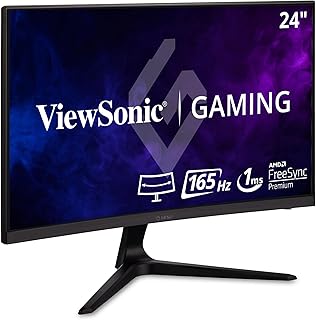
Viewsonic Omni VX2418C 24 Inch 1080p 1ms 165Hz Curved Gaming
Why We Love It

FeuVision 27inch Gmaing Monitor 144Hz
Why We Love It

KOORUI E2411H 23.8 inch Monitor Full HD
Why We Love It

LG 24GS50F-B 24-inch FHD (1920 x 1080) UltraGear Gaming
Why We Love It

SADES SD-Seal SA-F05F22B V2 22-Inch Full HD 1920x1080 Flat
Why We Love It

UPERFECT 2K 144Hz Portable Monitor 17.3 Inch 2560x1440P
Why We Love It

LG Ultragear G4 Gaming Monitor 27G411A-B
Why We Love It
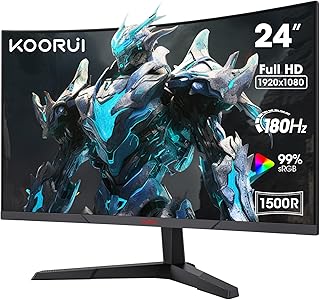
KOORUI 24 Inch Gaming Monitor -FHD 1080P Curved Monitor
Why We Love It

KOORUI monitor MY-GN06-US3 27 Inch Gaming Monitor
Why We Love It
Quick Pick
10 Best 144hz Gaming Monitor Of 2026
Quick Pick
LG 24G411A-B Ultragear Full HD (1920x1080) IPS Gaming Monitor, 144Hz (O/C), 1ms MBR Compatible, NVIDIA G-Sync, AMD FreeSync, HDR10, HDMI, DisplayPort, Slim Support, Black
Viewsonic Omni VX2418C 24 Inch 1080p 1ms 165Hz Curved Gaming Monitor with AMD FreeSync Premium, Eye Care, HDMI and DisplayPort
FeuVision 27inch Gmaing Monitor 144Hz, FHD 1080p Computer Monitor, IPS, 1ms Response Time, 3-Sided Frameless, Ultra Slim, VESA Mountable, Anti-Blue Light Design, HDMI, DP
KOORUI E2411H 23.8 inch Monitor Full HD, 120 Hz, 5ms, Eye Comfort, sRGB% 99 Farbumfangs, (1920 x 1080, HDMI, VGA, Neigbar, VESA 75x75)
LG 24GS50F-B 24-inch FHD (1920 x 1080) UltraGear Gaming monitor with 180Hz, 1ms MBR, HDR10, AMD FreeSync, HDMI, DisplayPort, 3-Side Virtually Borderless Design, Black
SADES SD-Seal SA-F05F22B V2 22-Inch Full HD 1920x1080 Flat VA Gaming Monitor, 144Hz Refresh Rate, 1ms MPRT, HDMI 2.1, DisplayPort 1.4, Adaptive Sync, HDR, Built-in Speakers, Low Blue Light, Black
UPERFECT 2K 144Hz Portable Monitor 17.3 Inch 2560x1440P Portable Gaming Monitor Travel Monitor for Laptop HDR IPS Screen with VESA, Cover Stand, Dual Speakers for PC Phone Game Console
LG Ultragear G4 Gaming Monitor 27G411A-B, 27 Inch, 1080p, 144Hz Overclocked, 5ms, IPS Display, HDR 10, NVIDIA G-Sync Compatible & AMD FreeSync, Smart Energy Saving, DisplayPort, HDMI
KOORUI 24 Inch Gaming Monitor -FHD 1080P Curved Monitor 165Hz VA 1ms 1500R PC Monitors with Adaptive Sync, HDMI X2 /DP, VESA Compatible, Tilt Adjustable, Eye Care
KOORUI monitor MY-GN06-US3 27 Inch Gaming Monitor
Buying Guide: 144hz Gaming Monitor
📋 Table of Contents
1What resolution should I look for in a 144Hz gaming monitor?
For a 144Hz monitor, 1080p (Full HD) is sufficient for most casual and mid-tier gamers, while 1440p (QHD) or 4K (UHD) offers sharper visuals. However, higher resolutions may require a more powerful GPU to maintain smooth performance at 144Hz without downscaling or reduced frame rates.
2Is a TN, IPS, or VA panel better for a 144Hz gaming monitor?
TN panels offer the fastest response times (1ms) and are ideal for competitive gaming, but have limited color accuracy. IPS panels provide better color reproduction and viewing angles but may have slightly slower response times. VA panels offer the best contrast but are generally too slow for 144Hz gaming.
3What refresh rate and input lag should I prioritize?
A true 144Hz refresh rate is essential for smooth gameplay, and look for a monitor with a low input lag (under 4ms) to ensure responsive controls. Monitors with adaptive sync technologies like G-Sync or FreeSync help eliminate screen tearing and stuttering during fast-paced games.
4What size monitor is best for a 144Hz gaming setup?
A 24- to 27-inch monitor is ideal for most 144Hz gaming setups, balancing screen real estate and immersion. Larger sizes like 32 inches can work for less demanding games or wider field-of-view titles, but may require a more powerful GPU to maintain performance at 144Hz.
5Are curved or flat screens better for 144Hz gaming?
Flat screens are generally preferred for competitive gaming due to more accurate mouse tracking and reduced distortion. Curved monitors can enhance immersion and provide a wider field of view, but may cause eye strain during long sessions if not properly calibrated or positioned.
How we choose
Our editors are people who genuinely love testing and writing about products. We compare each product's real-world usability and strengths, then distill what matters most into our own "Why We Love It" points — so you get an honest, at-a-glance sense of what counts before you buy.