10 Best 14 Inch Portable Monitor For Laptop Of 2026
14 Inch Portable Monitor For Laptop — Reviews, Recommendations & Updated Buying Guide November 2026


UPERFECT 14” Portable Monitor Touchscreen
Why We Love It


UPERFECT Portable Monitor 14" FHD 1920x1200 Portable Screen
Why We Love It

UPERFECT Touchscreen OLED Portable Monitor 14"
Why We Love It

VILVA 14" 1200p USB-C HDMI HDR Portable Monitor
Why We Love It

Blackview Laptop Screen Extender
Why We Love It

Verbatim PM-14 Portable Monitor
Why We Love It

ARZOPA Portable Monitor Kickstand
Why We Love It

Newsoul 14" Portable Monitor
Why We Love It
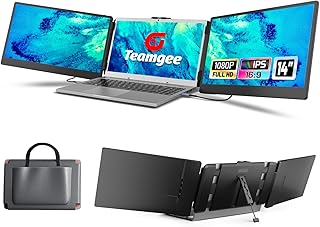
Teamgee Laptop Screen Extender
Why We Love It
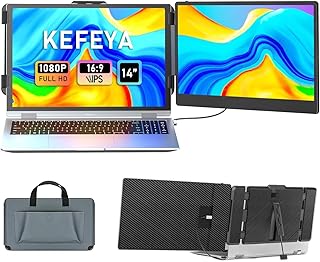
KEFEYA Laptop Screen Extender
Why We Love It
Quick Pick
10 Best 14 Inch Portable Monitor For Laptop Of 2026
Quick Pick
UPERFECT 14” Portable Monitor Touchscreen, 125% sRGB 1080P FHD IPS Ultra-Thin Travel Second Screen with 10-Point Touch, Built-in Speakers, VESA Mount & Smart Cover for Laptop, Phone & Game Console
UPERFECT Portable Monitor 14" FHD 1920x1200 Portable Screen 16:10 Small Display 2000:1 Contrast Matte Travel Display w/Stand&VESA, USB-C/HDMI, Ultra-Slim Second Screen for Laptop, Phone, Game Console
UPERFECT Touchscreen OLED Portable Monitor 14", 3K 2880x1800 | 120Hz | 0.1ms Portable Gaming Monitor, 500 Nits |120% DCI-P3 | 500000:1 | Ultra-Slim Design for Laptop Mini PC Phone Game Consoles
VILVA 14" 1200p USB-C HDMI HDR Portable Monitor | 14" 1200p IPS HDR, USB-C/HDMI, smart cover+speakers, ultra-slim plug&play, for PC/Mac/Phone.
Blackview Laptop Screen Extender,14" Portable Monitor [FHD 1080P TÜV SÜD & Ultra-Slim],Two Cable USB C Travel for 13-17" Laptop,Plug & Play Compatible with Windows/Mac/Chrome OS
Verbatim PM-14 Portable Monitor, 14" 1080P Full HD @ 60Hz, HDMI/Type-C/USB-C for Laptop/PC/Mac/PS3/4/5/Xbox/Phone - Works with Windows, Mac OS & Android
ARZOPA Portable Monitor Kickstand, 14.0" Ultra Slim Portable Laptop Monitor FHD 1080P External Display with Dual Speakers Second Screen for Laptop PC Phone Xbox PS4/5 Switch-A1S
Newsoul 14" Portable Monitor, FHD 1920x1200 IPS Display, 16:10 Travel Monitor with Stand & VESA, USB-C HDMI External Screen for Laptop, Phone, PC, Gaming Console
Teamgee Laptop Screen Extender, 14" Full HD Portable Monitor for Laptop with Speakers & Flexible Kickstand, Plug-Play Monitor Extender (13"-17" Diagonal) with Wins/Mac/Dex/Android OS
KEFEYA Laptop Screen Extender, 14" FHD 1080P IPS Laptop Monitor Extender Dual Screen, Portable Monitor for Laptops 13-17" with USB-C/HDMI Port, Plug n Play for Windows/Mac/Android/Switch/PS5
Buying Guide: 14 Inch Portable Monitor For Laptop
📋 Table of Contents
1What resolution should I look for in a 14-inch portable monitor?
Opt for at least 1080p (Full HD) for clear visuals, with 2K (QHD) being ideal for graphic design or video editing. Higher resolutions strain battery life, so balance clarity with portability based on your primary use.
2Does the monitor support USB-C or HDMI connectivity?
USB-C with DisplayPort Alt Mode is essential for laptops with a single port, offering power delivery and video output in one. HDMI is also useful but less versatile for charging and data transfer, so prioritize USB-C if possible.
3What battery life is realistic for a 14-inch portable monitor?
Most models offer 2-4 hours of continuous use on a full charge, depending on brightness and resolution. Look for models with at least 10,000mAh batteries for longer sessions, especially if you use it away from a power source often.
4Is a built-in stand or stand compatibility important?
A built-in stand or VESA mount compatibility allows for flexible positioning, which is crucial for ergonomics. Without it, you may need an external stand, adding bulk and cost, so check for adjustable height and tilt options.
5What are the key differences between IPS and TN panel types?
IPS panels offer wider viewing angles and more accurate color reproduction, ideal for creative work. TN panels are faster with lower input lag, better for gaming. Choose IPS for general use and TN if you prioritize responsiveness for specific tasks.
How we choose
Our editors are people who genuinely love testing and writing about products. We compare each product's real-world usability and strengths, then distill what matters most into our own "Why We Love It" points — so you get an honest, at-a-glance sense of what counts before you buy.