10 Best 13mp Document Camera Of 2026
13mp Document Camera — Reviews, Recommendations & Updated Buying Guide November 2026


INS-2 UHD 4K 13MP Document Camera
Why We Love It


INS-Flip 4 Foldable 4K 13MP Document Camera
Why We Love It

Ipevo V4K Ultra 13MP USB Document Camera
Why We Love It

IRIScan Visualizer 7 4K Document Camera 13MP Grey Green A3
Why We Love It
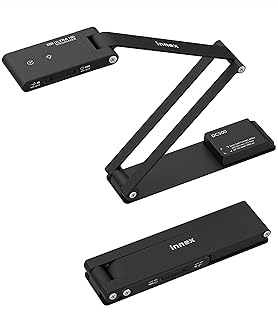
Innex DC500 13MP 4K USB Document Camera
Why We Love It
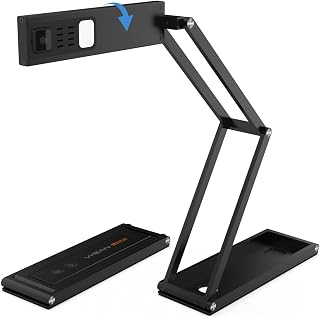
VIISAN P4U USB Document Camera & Webcam Max Resolution 4K
Why We Love It

OKIOLABS OKIOCAM S2 Pro 4K USB Visualiser with OKIOPoint
Why We Love It

First Wave Portable Document Scanner
Why We Love It

JOYUSING 4K Document Camera for Teachers with Light
Why We Love It

VIISAN VS13AM 13MP Book & Document Scanner
Why We Love It
Quick Pick
10 Best 13mp Document Camera Of 2026
Quick Pick
INS-2 UHD 4K 13MP Document Camera, Built-in LED, Mic, A3 Capture | Dual Auto‑Focus, Plug & Play, Compatible with Mac, Windows, Chromebook, Ideal for large documents, artworks, big classrooms
INS-Flip 4 Foldable 4K 13MP Document Camera, LED, Mic,Light 0.67 lbs | Auto Focus, Plug & Play, Portable design, ultra-slim 0.68”, Works with Windows/Mac/Chromebook, Ideal for teaching & learning
Ipevo V4K Ultra 13MP USB Document Camera, 4K Ultra HD Resolution, Auto-Focus, High-Definition Imaging, Plug and Play. On-The-go, for Teaching, visualization, Online Learning, and Web conferencing
IRIScan Visualizer 7 4K Document Camera 13MP Grey Green A3 Portable Scanner for Education and Video Conferencing, USB Compatible with Windows and Mac
Innex DC500 13MP 4K USB Document Camera, Webcam & Scanner, 3-in-1 | Noise-Cancelling Mic, Dual Autofocus, Auto Flip, LED lamp, OCR for Distance Education, Meetings, Windows/Mac/Chromebook
VIISAN P4U USB Document Camera & Webcam Max Resolution 4K 13MP Sensor Frame Rate up to 60fps Auto Focus 3X Zoom Microphone & LED for Web Conferencing & Remote Learning Windows, Mac, ChromeOS
OKIOLABS OKIOCAM S2 Pro 4K USB Visualiser with OKIOPoint AI-Tracking, 13-mp, Webcam and Document Camera for Teaching, with LED Light, for PC/Mac/Chromebook, comes with Type-C Adaptor
First Wave Portable Document Scanner – 13 MP USB Document Camera, Fast Scan 1s/Page, Capture Size A4, Easy-to-Use OCR, Travel-Friendly Mobile Scanner
JOYUSING 4K Document Camera for Teachers with Light, for Online Teaching, Distance Learning, Web Conferencing, Compatible with Mac, Windows
VIISAN VS13AM 13MP Book & Document Scanner, 4K@30FPS USB Camera with AI Noise Reduction, Auto-Rotate G-Sensor, AF-C/AF-S Lens, 20X Macro View, UVC/UAC Plug & Play for ChromeOS Windows & macOS
Buying Guide: 13mp Document Camera
📋 Table of Contents
1Does 13MP resolution make a real difference for document imaging?
Yes — 13MP provides sharp, detailed images of text and graphics, especially for A4-sized documents. It’s ideal for capturing fine print and color accuracy, but higher MP doesn’t always mean better quality if sensor size or lens quality is poor.
2What lighting features should I look for in a 13MP document camera?
Look for adjustable LED lighting with at least 10,000–20,000 lux brightness and a daylight white balance (5500–6500K) to reduce glare and shadows. Some models offer ring lights or overhead lamps for even illumination on reflective or dark surfaces.
3Is a USB or HDMI connection better for my setup?
USB is plug-and-play and works with most computers, while HDMI requires a compatible display or capture device. For direct projection, HDMI is better, but for editing or saving files, USB is more versatile and widely supported.
4What frame rate matters for live use, like classroom presentations?
For smooth video, aim for at least 30fps at full resolution. Lower frame rates (15fps) can cause choppy movement, which is distracting during live demonstrations or when panning across a document or object.
5Are built-in zoom and focus features worth paying extra for?
Digital zoom can reduce image quality, but optical zoom (if available) or motorized focus is more valuable for sharp close-ups. Look for 10x or more optical zoom and manual or auto focus options depending on your use case, like scanning small text or 3D objects.
How we choose
Our editors are people who genuinely love testing and writing about products. We compare each product's real-world usability and strengths, then distill what matters most into our own "Why We Love It" points — so you get an honest, at-a-glance sense of what counts before you buy.