10 Best 13 In 1 Docking Stations Of 2026
13 In 1 Docking Stations — Reviews, Recommendations & Updated Buying Guide November 2026


13 in 1 USB C Docking Station
Why We Love It


Anker Nano 13-in-1 Laptop Docking Station with Detachable
Why We Love It

ONTEN Dock Station
Why We Love It

Dual Cooling Fans 13 in 1 Steam Deck Docking Station with
Why We Love It

UGREEN Laptop Docking Station
Why We Love It
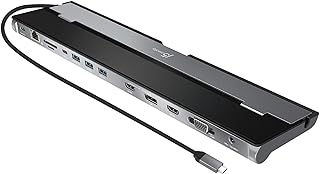
J5create USB C 13 in 1 4K Triple Display Docking Station
Why We Love It

TOTU Docking Station
Why We Love It

Selore USB C Laptop Docking Station Dual Monitor
Why We Love It

Selore 13-in-1 Triple Monitor with Dual HDMI
Why We Love It

MOKiN USB C Docking Station Dual HDMI 13 in 1 Laptop
Why We Love It
Quick Pick
10 Best 13 In 1 Docking Stations Of 2026
Quick Pick
13 in 1 USB C Docking Station, Triple Monitor Dock Dual HDMI Dock USB C Laptop Dock USB 3.0/2.0, USB C 3.0, 100W PD, SD/TF, 3.5mm Audio, USB C Dock Multiport Adapter fo r Lenovo, Surface, HP Laptops
Anker Nano 13-in-1 Laptop Docking Station with Detachable 6-in-1 Hub, USB-C 3 Display Docking (2 HDMI+1 DP), 10 Gbps USB-C, 3 USB-A, Audio, SD/TF, Ethernet, 100W Max PD for Dell/Lenovo/HP Home Office
ONTEN Dock Station, 13 in 1 USB C Docking Station ,USB C Network Hub with HDMI VGA PD(3.0),4*USB 2*USB C,10/100M Gigabit. Laptop Stand for MacBook iPad Surface pro and More Windows Laptop
Dual Cooling Fans 13 in 1 Steam Deck Docking Station with 4K@60Hz 5 USB Ports,1000Mbps,SD/TF Slot,USB-C 100W PD, 40Gbps Adapter for Steam Deck/Rog Ally/Switch/Legion Go
UGREEN Laptop Docking Station, 13-in-1 Triple 4K Display Dock (2 HDMI + DP) | 100W Max PD, 27W Max USB-C, 10Gbps USB-C/A, Ethernet, SD/TF, Audio, for Dell/Lenovo/HP (Windows Only, Included 140W Adapter)
j5create USB C 13 in 1 4K Triple Display Docking Station - Resolution Support 4K HDMI, 1080p VGA, 4K DisplayPort outputs, 100W Power Delivery, USB 3.0 ports (1 USB-C and 3 USB Type-A ports) - JCD543
TOTU Docking Station, 13 in 1 USB C Docking Station with Dual 4K HDMI, VGA, 82W PD, 4 USB, Laptop Docking Station and Stand for MacBook and support Triple Display on Windows Laptop with Thunderbolt 3
Selore USB C Laptop Docking Station Dual Monitor, 13-in-1 USB C Hub Adapter Docking Station 3 Monitors with 4K DP+4K HDMI+PD+RJ45 Ethernet+USB 3.1&2.0 port+SD/TF+Audio Compatible for MacBook Dell HP
Selore 13-in-1 Triple Monitor with Dual HDMI, DP, 100W PD, Gigabit Ethernet, 10Gbps USB A/C Ports -Laptop Docking Stations for Dell, HP, Lenovo, MacBook
MOKiN USB C Docking Station Dual HDMI 13 in 1 Laptop Charging Station with 2.26 Inch LCD Smart Display, Dual 4K HDMI Display, 10 Gbps USB A/C Ports, Gigabit Ethernet, 160 W Max Output for Dell, HP
Buying Guide: 13 In 1 Docking Stations
📋 Table of Contents
1What types of devices are compatible with 13 in 1 docking stations?
Most 13 in 1 docks support USB-C, HDMI, USB-A, SD/TF cards, and audio jacks. Look for docks with USB-C PD 3.0 and Thunderbolt 3/4 for full compatibility with laptops, tablets, and smartphones. Check if it supports your specific device’s charging and data transfer protocols.
2How much power output do I need for charging?
For laptops, aim for at least 60W to 100W power delivery. A 65W or 90W USB-C port ensures fast charging without overloading your device. Lower wattage may only charge phones or tablets, not full-sized laptops efficiently.
3Are all 13 ports active at the same time?
Not always — some docks disable certain ports when charging a laptop to avoid power overload. Look for models that clearly state all ports function simultaneously, especially if you need to charge and use multiple peripherals at once.
4What video output resolution should I look for?
For 4K displays, choose a dock with HDMI 2.0 or DisplayPort 1.4. If you only need 1080p or dual 1080p monitors, a standard HDMI 1.4 port may suffice. USB-C docks with 4K support typically require a DisplayPort or mini DisplayPort adapter for best performance.
5What accessories or cables come included?
Many 13 in 1 docks include a USB-C to USB-C cable, but not always. Check if you need to buy a separate cable for charging or video output. Some models also include SD/TF card readers or a dongle for additional ports, which can save you from buying extra adapters later.
How we choose
Our editors are people who genuinely love testing and writing about products. We compare each product's real-world usability and strengths, then distill what matters most into our own "Why We Love It" points — so you get an honest, at-a-glance sense of what counts before you buy.