10 Best 120hz Computer Monitors Of 2026
120hz Computer Monitors — Reviews, Recommendations & Updated Buying Guide November 2026


LG 27U411A-B 27-inch Full HD (1920 x 1080) IPS Computer
Why We Love It

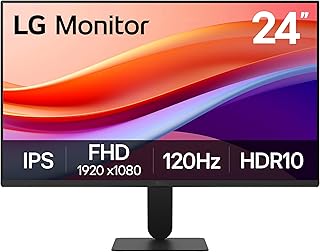
LG 24U411A-B 24-inch Full HD (1920 x 1080) IPS Computer
Why We Love It

KOORUI E2411H 23.8 inch Monitor Full HD
Why We Love It

Sades 22" FHD IPS Gaming Monitor | 120Hz
Why We Love It

HAW F27IPX 27 Inch Gaming Monitor
Why We Love It

LG Monitor 27U411A-B - FHD 1080p IPS 27 inch
Why We Love It

ASUS ProArt Display PA278QV Gen2 (PA278QGV) Professional
Why We Love It

UPERFECT Portable Monitor 18.5 inch 120HZ 100% sRGB 1080P
Why We Love It

Acer EK241Y Gbmix 23.8" FHD IPS Monitor
Why We Love It
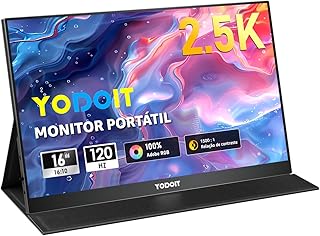
Yodoit Portable Monitor 16" 2.5K QHD 120 Hz Monitor Screen
Why We Love It
Quick Pick
10 Best 120hz Computer Monitors Of 2026
Quick Pick
LG 27U411A-B 27-inch Full HD (1920 x 1080) IPS Computer Monitor, 120Hz, HDR10, Reader Mode, Flicker Safe, HDMI, Slim Stand Base, Black
LG 24U411A-B 24-inch Full HD (1920 x 1080) IPS Computer Monitor, 120Hz, HDR10, Reader Mode, Flicker Safe, HDMI, Slim Stand Base, Black
KOORUI E2411H 23.8 inch Monitor Full HD, 120 Hz, 5ms, Eye Comfort, sRGB% 99 Farbumfangs, (1920 x 1080, HDMI, VGA, Neigbar, VESA 75x75)
Sades 22" FHD IPS Gaming Monitor | 120Hz, 1ms Response, Adaptive Sync | HDR, Eye-Care, Full HD 1920x1080 | White - SA-F01F22-W
HAW F27IPX 27 Inch Gaming Monitor, FHD (1920×1080) IPS Display, 120Hz Refresh Rate, 0.5ms MPRT, G-Sync & FreeSync Compatible, Built-In Speakers, Flat Screen, PC & Console Ready - Black
LG Monitor 27U411A-B - FHD 1080p IPS 27 inch, 120Hz, 5ms GtG, Computer desktop display with VRR, HDR10, Smart Energy Saving, Anti-Glare, D-Sub, HDMI, Matte Black
ASUS ProArt Display PA278QV Gen2 (PA278QGV) Professional Monitor – 27-inch, IPS, QHD (2560 x 1440), 120Hz, Light Sync, ergonomic stand, VESA MediaSync, Green Sustainability - Grey
UPERFECT Portable Monitor 18.5 inch 120HZ 100% sRGB 1080P with VESA & Stand 180° Adjustable Ultra-Slim & Lightweight Frameless FHD FreeSync IPS HDR Gaming Display, Travel Second Monitor for Laptop | 1080P FreeSync 1ms IPS USB-C Mini HDMI Travel Second Screen with Kickstand, Bag, VESA, for Laptop, PC, Phone, Game Consoles
Acer EK241Y Gbmix 23.8" FHD IPS Monitor, 120Hz Refresh Rate, 1ms VRB, HDMI & VGA, Eye Care Technology, UM.QE1EE.605, Black
Yodoit Portable Monitor 16" 2.5K QHD 120 Hz Monitor Screen IPS 2560x1600 16:10 Display with USB Type C Port and Built-in Speakers with Smart Cover Monitor Compatible with PC, Laptop, MacBook, Xbox
Buying Guide: 120hz Computer Monitors
📋 Table of Contents
1What refresh rate is actually needed for a 120Hz monitor, and when does it matter?
A 120Hz monitor is ideal for gaming, video editing, or fast-paced content where smooth motion is key. It offers twice the refresh rate of 60Hz, reducing motion blur and input lag. It’s most beneficial for competitive gaming or high-frame-rate video playback, but less critical for general browsing or office work.
2What resolution options are typically available with 120Hz monitors?
Most 120Hz monitors come in 1080p, 1440p, or 4K resolutions. Higher resolutions like 1440p or 4K may require a more powerful GPU to maintain 120Hz performance. For gaming, 1440p at 120Hz is a popular sweet spot between visual quality and performance.
3Does a 120Hz monitor need a high-speed HDMI or DisplayPort connection?
Yes — to support 120Hz, you’ll need a DisplayPort 1.2 or higher, or HDMI 2.0 or higher. Older ports like HDMI 1.4 or DisplayPort 1.1 may limit you to 60Hz. Always check your graphics card and monitor specs to ensure compatibility for smooth high-refresh-rate performance.
4What panel type is best for a 120Hz monitor, and why?
IPS panels offer better color accuracy and wider viewing angles, while TN panels provide faster response times, often under 1ms. For gaming, TN is preferred for its speed, but IPS is better for creative work. VA panels are less common at 120Hz due to slower response times and lower contrast.
5Are there any common mistakes people make when buying a 120Hz monitor?
Many overlook the importance of response time and input lag, which can negate the benefits of a high refresh rate. Also, some assume all 120Hz monitors are the same, but differences in resolution, panel type, and connectivity can greatly affect performance. Always match the monitor to your intended use and hardware capabilities.
How we choose
Our editors are people who genuinely love testing and writing about products. We compare each product's real-world usability and strengths, then distill what matters most into our own "Why We Love It" points — so you get an honest, at-a-glance sense of what counts before you buy.