10 Best 12 Port Hubs Controllers Of 2026
12 Port Hubs Controllers — Reviews, Recommendations & Updated Buying Guide November 2026


12V PC Case Fan Speed Controller Hub
Why We Love It


ARGB Fan Hub Controller
Why We Love It

Thermalright ARGB and Fan HUB X12 IR Black
Why We Love It

NALACAL ARGB Fan HUB Controller
Why We Love It
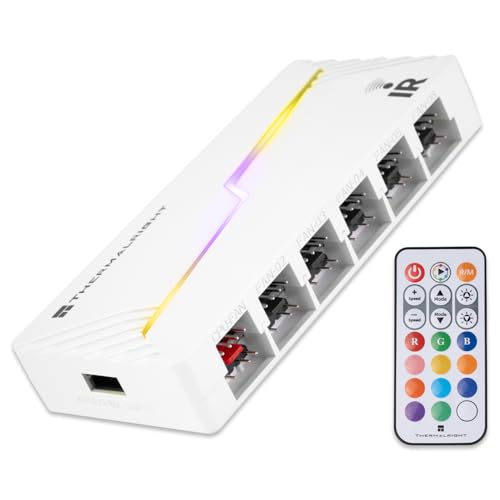
Thermalright 12-Fan Hub Supporting ARGB and PWM
Why We Love It

20-Port ARGB PWM Hub
Why We Love It

Cooling Fan Speed Knob Controller 12V 4 Pin PWM PC Chassis
Why We Love It

GCP09 ARGB and PWM Fan Hub Controller
Why We Love It
Thermalrlght ARGB and Fan HUB X12 IR Black
Why We Love It

NALACAL ARGB Fan HUB Controller with Remote Control
Why We Love It
Quick Pick
10 Best 12 Port Hubs Controllers Of 2026
Quick Pick
12V PC Case Fan Speed Controller Hub, 4-Pin PWM Adjustable Knob for 4 Fans, High Power 60W Max Output, SATA Powered Adapter for Gaming Desktop Computer Water Cooling System
ARGB Fan Hub Controller,12 Port PWM Fan Splitter with Infinity Mirror Design and SATA Power,Compatible with 3-Pin 4-Pin Fans for Custom PC RGB Cooling Setup No 5V Header Required,Black
Thermalright ARGB and Fan HUB X12 IR Black,12-Port 4Pin PWM Controller,5V-3pin ARGB,Supports 12 Fan Interface Connections and Comes with A Remote Control for Lighting, Without Sata Cable Included
NALACAL ARGB Fan HUB Controller, PWM Fan Hub Support 8 Groups of Fans for Addressable 5V 3Pin ARGB & 12V 4Pin PWM, 2-in-1 RGB Case Fan Hub with Hidden Magnetic Base and SATA Power
Thermalright 12-Fan Hub Supporting ARGB and PWM,Easy Cable Management
20-Port ARGB PWM Hub, Azonee RGB Controller 12V 5V 2-in-1 Integrated Fan Hub, Digital Control of Lighting & Fan Speed (White)
Cooling Fan Speed Knob Controller 12V 4 Pin PWM PC Chassis Fan Adapter Hub, Power Supplied with SATA Interface for 4 Fans - 1 PCS
GCP09 ARGB and PWM Fan Hub Controller, 10 PWM Ports & 12 ARGB Ports PC Case Fan SATA Power Hub, Software & Remote Adjustment Magnetic Backplate Individual Fan Control, Black
Thermalrlght ARGB and Fan HUB X12 IR Black,12-Port 4Pin PWM Fan Controller,5V-3pin ARGB,Supports 12 Fan Interface Connections and Comes with A Remote Control for Lighting, Without Sata Cable Included
NALACAL ARGB Fan HUB Controller with Remote Control, PWM Fan Hub Support 9 Groups of Fans for Addressable 5V 3Pin ARGB & 12V 4Pin PWM, 2-in-1 RGB Case Fan Hub with Hidden Magnetic Base and SATA Power
Buying Guide: 12 Port Hubs Controllers
📋 Table of Contents
1What power output should I look for in a 12-port hub controller?
Look for a power output of at least 100W to 150W to ensure stable performance across all connected devices. Lower wattage may cause voltage drops, especially when multiple high-draw devices are in use, leading to potential malfunctions or reduced lifespan of connected peripherals.
2Should I choose a USB 3.0 or USB 2.0 12-port hub controller?
Opt for USB 3.0 for faster data transfer speeds, especially if you're connecting external hard drives or high-speed devices. USB 2.0 is sufficient for basic peripherals like keyboards and mice, but USB 3.0 hubs often include backward compatibility for USB 2.0 devices without sacrificing performance.
3What’s the difference between a powered and unpowered 12-port hub controller?
A powered hub has its own power supply, ensuring stable power delivery to all connected devices, which is essential for devices like external hard drives or USB fans. Unpowered hubs rely on the host port’s power, which may be insufficient for multiple high-power devices and can lead to performance issues or device disconnections.
4How important is the build quality and material of a 12-port hub controller?
Look for hubs made with durable plastic or metal housings to ensure longevity and heat dissipation. Poorly constructed hubs may overheat or fail under heavy use, especially when running multiple devices simultaneously. Reinforced ports and gold-plated connectors also improve signal integrity and durability.
5Are there any common mistakes to avoid when buying a 12-port hub controller?
Avoid hubs with insufficient power delivery or those that don’t specify their power output. Also, be wary of hubs with too many ports crammed into a small space, as this can lead to overheating. Always check for compatibility with your devices and ensure the hub supports the required USB version for your needs.
How we choose
Our editors are people who genuinely love testing and writing about products. We compare each product's real-world usability and strengths, then distill what matters most into our own "Why We Love It" points — so you get an honest, at-a-glance sense of what counts before you buy.