10 Best 11 Bay Servers Of 2026
11 Bay Servers — Reviews, Recommendations & Updated Buying Guide November 2026


SYOSI Drive Bay, Server Hard Drive Bay
Why We Love It


Rosewill Thor NAS, Full Tower Workstation Case
Why We Love It

TERRAMASTER F2-425 2-Bay NAS
Why We Love It

UGREEN NAS DXP4800 GT 4-Bay for Creators
Why We Love It

TERRAMASTER F4-212 4-Bay NAS
Why We Love It

TERRAMASTER F6-425 Pro NAS Server
Why We Love It

TERRAMASTER D5-310 5-Bay Hardware RAID Enclosure
Why We Love It

Zimaboard 432 Single Board Server Router X86 Single Board
Why We Love It

Portofino, Round Cake Stand, 11" D x 4"
Why We Love It
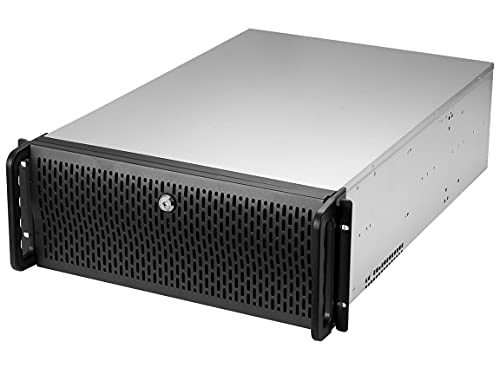
Rosewill 4U Server Chassis Rackmount Case
Why We Love It
Quick Pick
10 Best 11 Bay Servers Of 2026
Quick Pick
SYOSI Drive Bay, Server Hard Drive Bay, Hard Drive Tray Caddy, for Dell Poweredge Series 11/12/13 Generation Models 3.5"", SAS/SATA HDD Caddy Bracket, 2 Pcs
Rosewill Thor NAS - Full Tower Workstation Case | Server Chassis | Supports up to 11 3.5" HDD or 13 2.5" SSD | E-ATX Compatible | 1x 140mm PWM Fan | USB 3.2 Type-C | AI Servers & DIY NAS
TERRAMASTER F2-425 2-Bay NAS, N5095, 4GB DDR4, 2.5GbE, Diskless | Auto-back up phones and PCs, organize photos with local AI, and stream 4K media via Plex or Emby from one home NAS.
UGREEN NAS DXP4800 GT 4-Bay for Creators, Tech Enthusiasts and Office Teams | Smart Home Data Hub, Direct NAS Editing & Dual 10GbE Transfers, Ryzen R2514, 8GB DDR4, 2x 10GbE, 2x M.2 NVMe Slots, Diskless
TERRAMASTER F4-212 4-Bay NAS, Quad-Core CPU, 2GB DDR4, Diskless | 2GB RAM and TOS 7 with 4K decoding, cross-platform file sharing, and multiple backup tools for home storage.
TERRAMASTER F6-425 Pro NAS Server, Intel Core i3-1315U, 8GB DDR5 (Diskless)
TERRAMASTER D5-310 5-Bay Hardware RAID Enclosure, USB-C, 120TB, Diskless | RAID 5/0/1/10 and hot spare, up to 120TB and 220MB/s, plus temperature-controlled cooling and free backup software.
zimaboard 432 Single Board Server Router X86 Single Board Computer Personal Cloud Network Attached Storage 4K Media Server Dual Gigabit Gateway - PCIe x4 SATA 6.0 Gb/s for HDD/SSD (ZMB432)
Portofino, Round Cake Stand, 11" D x 4"
Rosewill 4U Server Chassis Rackmount Case | 8 x 3.5 HDD Bays + 3 x 5.25 Devices | ATX, CEB Compatible | 2 x Front 120mm PWM Fans + 2 x Rear 80mm Fans | 2 x USB 3.0 | Front Panel Lock | RSV-R4000U
Buying Guide: 11 Bay Servers
📋 Table of Contents
1What kind of workload is an 11-bay server best suited for?
11-bay servers are ideal for mid-sized businesses or data centers needing high storage density and redundancy. They support 10 hot-swappable drives plus a cache drive, making them great for file servers, virtualization, and backup solutions with RAID configurations like 10+1 or 9+2 for performance and fault tolerance.
2How much storage capacity can I realistically expect from an 11-bay server?
With 10 data drives and 1 cache drive, you can expect up to 100TB or more using 10TB+ SAS or NVMe SSDs. For NAS or backup, 40–80TB is common with 4–8TB drives. Look for models with at least 10GbE or 25GbE networking to avoid bottlenecks with large datasets.
3Is an 11-bay server overkill for home or small office use?
Yes, unless you need extreme storage scalability or run a local media server with hundreds of TB of data. For most small offices, a 4–8 bay server is more cost-effective and easier to manage. 11-bay servers are better for professional environments with multiple users and mission-critical data.
4What are the key differences between SAS and NVMe drives in 11-bay servers?
SAS drives offer better reliability and are ideal for 24/7 workloads, while NVMe drives deliver faster read/write speeds and lower latency, perfect for virtualization and high-performance databases. SAS is more common in 11-bay servers for redundancy, but NVMe is growing in popularity for speed-critical applications.
5What accessories or add-ons are essential for an 11-bay server setup?
A redundant power supply is a must for uptime, and a PCIe NVMe cache card can boost performance. A 10GbE or 25GbE network card is also recommended for fast data transfer. Don’t forget hot-swap drive trays, a KVM switch for multi-server management, and a rackmount chassis if you plan to install it in a data center.
How we choose
Our editors are people who genuinely love testing and writing about products. We compare each product's real-world usability and strengths, then distill what matters most into our own "Why We Love It" points — so you get an honest, at-a-glance sense of what counts before you buy.