10 Best 10kg Monitor Arms Of 2026
10kg Monitor Arms — Reviews, Recommendations & Updated Buying Guide November 2026


Essentials 360® Computer Monitor Arm with Gas Spring Monitor
Why We Love It


ErGear Single Monitor Arm
Why We Love It

SKY-TOUCH Dual Monitor Stand for Desk
Why We Love It
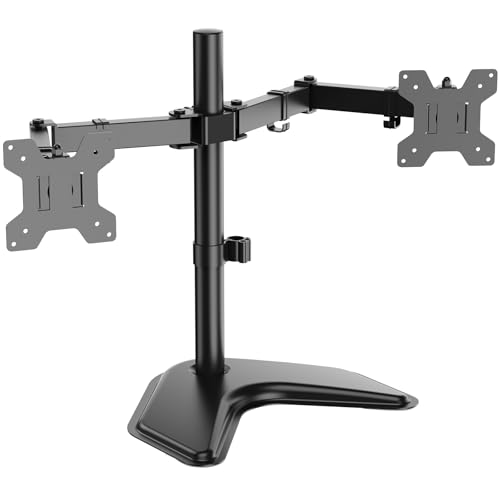
WALI Free Standing Dual LCD Monitor Fully Adjustable Desk
Why We Love It
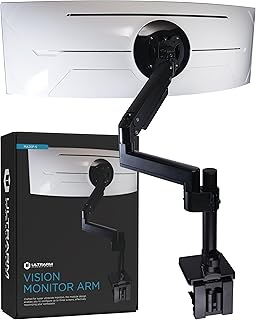
ULTRARM Heavy Duty Monitor Arm for Ultrawide Monitors up to
Why We Love It

NB North Bayou Monitor Desk Mount with Articulating Gas
Why We Love It
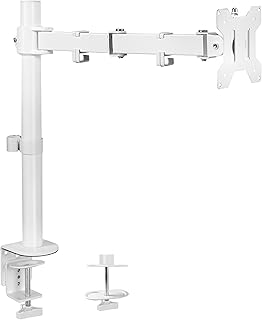
VIVO White Single 13 to 27 inch LCD Monitor Desk Mount Stand
Why We Love It

OVERMUST Double Monitor Arm for 13'' to 32'' Screens
Why We Love It

LIMOS Monitor Arm Desk Mount
Why We Love It
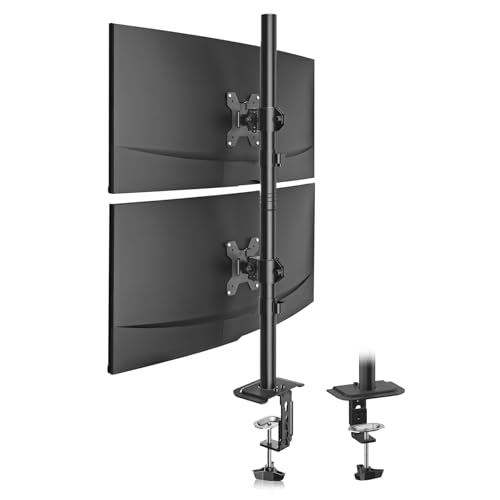
Suptek Dual LED LCD Monitor Stand up Desk Mount for 2 / Two
Why We Love It
Quick Pick
10 Best 10kg Monitor Arms Of 2026
Quick Pick
Essentials 360® Computer Monitor Arm with Gas Spring Monitor Mount Desk Mount Tilt Angle for 10-32 Inch Adjustable Height Load Capacity 10kg VESA 75x75/100x100mm with Grommet And C-Clamp Mounting
ErGear Single Monitor Arm, Fully Adjustable Monitor Mount for 13–34 Inch Screens, Fast Install Computer Stand with Tool-Free VESA Mount, Cable Management, Holds 9kg, Max VESA 100x100mm
SKY-TOUCH Dual Monitor Stand for Desk, Adjustable Spring Double Monitor Mount Holds for 17"–32" Computer Screens, Full Adjustable Monitor Stand with Clamp/Grommet Base, Holds up to 10kg per Arm
WALI Free Standing Dual LCD Monitor Fully Adjustable Desk Mount Fits Two Screens up to 27”, 22 lbs. Weight Capacity per Arm (MF002), Black
ULTRARM Heavy Duty Monitor Arm for Ultrawide Monitors up to 57" and 20 KGS, Single Desk Stand, Pneumatic Height Adjustable, Modular Extension Arms - Max VESA 100x100, Black, MA20P-S | Max 57", 44 lb, 900R Screens, VESA 100x100, Upgradable, Pneumatic Height Adjustable, C-clamp & Grommet Mount, Black, MA20P-S
NB North Bayou Monitor Desk Mount with Articulating Gas Spring Monitor Arm for 22''-35''Inch Curved Computer Monitors Height Adjustable Monitor Stand F100A-B
VIVO White Single 13 to 27 inch LCD Monitor Desk Mount Stand, Fully Adjustable, Tilt, Articulating | Holds 1 Screen with VESA up to 100x100mm (STAND-V001W)
OVERMUST Double Monitor Arm for 13'' to 32'' Screens - Height Adjustabe by up to 16Inch - Load Capacity 10 Kg - Maximum Extension up to 18Inch - Declination Angle +/-90° - 180°/230° Rotation
LIMOS Monitor Arm Desk Mount - Gas Spring Single Monitor Stand for 21-32 Inch Screens - Full Motion Articulating Height Adjustable VESA Mount - Ergonomic Computer Monitor Arm
Suptek Dual LED LCD Monitor Stand up Desk Mount for 2 / Two Screens up to 27 inch Extra Tall 31.5" Pole Heavy Duty Fully Adjustable Stand Vertical Array (MD6802)
Buying Guide: 10kg Monitor Arms
📋 Table of Contents
1What weight capacity should I look for in a 10kg monitor arm?
A 10kg monitor arm is designed to support up to 10 kilograms, but look for models with a slight safety margin, like 12kg or more, to ensure stability. This is especially important if you plan to mount multiple monitors or add accessories like a webcam or speakers.
2What materials are best for durability and adjustability?
High-quality 10kg monitor arms typically use steel or aluminum for the base and joints, with reinforced plastic for the arm segments. Steel offers greater strength, while aluminum is lighter. Look for arms with ball-and-socket joints for smooth, multi-directional movement and precise positioning.
3How does the height adjustment range affect usability?
A good 10kg monitor arm should offer a height adjustment range of at least 60–100cm to accommodate different desk heights and user preferences. A wider range allows for better ergonomics, especially if you share the desk or use the arm for multiple tasks like video calls or graphic design.
4What should I consider when choosing between fixed and adjustable arm lengths?
Fixed-length arms are simpler and more compact, ideal for single monitors in tight spaces. Adjustable arms allow you to extend or retract the arm as needed, which is better for multi-monitor setups or users who need flexibility. Choose based on your workspace layout and future needs.
5Are there any common mistakes to avoid when installing a 10kg monitor arm?
Avoid over-tightening the mounting bolts, as this can damage the desk or the arm’s base. Ensure the arm is securely fastened to a sturdy surface, and never exceed the weight limit. Also, check that the arm’s VESA mount matches your monitor’s compatibility to prevent wobbling or instability.
How we choose
Our editors are people who genuinely love testing and writing about products. We compare each product's real-world usability and strengths, then distill what matters most into our own "Why We Love It" points — so you get an honest, at-a-glance sense of what counts before you buy.