10 Best 1080p Streaming Webcams Of 2026
1080p Streaming Webcams — Reviews, Recommendations & Updated Buying Guide November 2026


UGREEN USB Webcam, Full HD 1080P/30fps Webcam for PC
Why We Love It


Logitech Brio 100 Full HD Webcam for Meetings and Streaming
Why We Love It

EMEET C960 1080P Webcam with Microphone
Why We Love It
UGREEN 4K/30fps Webcam for PC
Why We Love It

Logitech C922 Pro Stream Webcam
Why We Love It

UGREEN Full HD 1080P/30fps Webcam for PC/Laptop/Mac (Space
Why We Love It

Logitech MX Brio Ultra HD 4K Collaboration and Streaming
Why We Love It

Webcam Full HD 1080p with Dual Microphones
Why We Love It
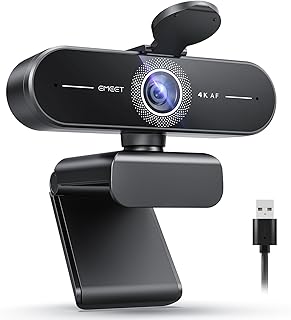
EMEET C60E 4K Webcam for Streaming & Gaming – PDAF Autofocus
Why We Love It

EMEET PIXY Dual-Camera AI-Powered PTZ Camera 4K
Why We Love It
Quick Pick
10 Best 1080p Streaming Webcams Of 2026
Quick Pick
UGREEN USB Webcam, Full HD 1080P/30fps Webcam for PC, Webcam with Microphone, Clear Stereo Audio, Auto Light Correction, 85° View Web Cam for Live Streaming, Video Calling, Studying, Conferences | Clear Stereo Audio Mics, Fixed Focus, Plug&Play, 85° View Webcam USB Camera for Live Streaming, Video Calling, Conferences
Logitech Brio 100 Full HD Webcam for Meetings and Streaming, Auto-Light Balance, Built-in Mic, Privacy Shutter, USB-A, for Microsoft Teams, Google Meet, Zoom and More-Graphite | Lighting Balance, Microphone, Lens Cap, USB-A for Microsoft Teams, Google Meet, Zoom etc - Graphite
EMEET C960 1080P Webcam with Microphone - Web Camera for PC & Laptop | Full HD Webcam|Privacy Cover|90° Angle Streaming Camera|Light Correction|for Linux, Win10, Mac OS|Dual Microphone|Plug & Play
UGREEN 4K/30fps Webcam for PC, Full HD Webcam for Laptop, Clear Stereo Audio Microphone, Auto Light Correction, 70° View Web Cam USB Camera for Live Streaming, Video Calling, Conferences | Support Clear Stereo Audio Microphone, 70° View Web Cam USB Camera for Laptop, Live Streaming, Video Calling, Conferences
Logitech C922 Pro Stream Webcam, HD 1080p/30fps or 720p/60fps Hyperfast Streaming, Stereo Audio, Light Correction, Autofocus, for YouTube, Twitch, XSplit, PC/Mac/Laptop/MacBook/Tablet-Black | Full HD 1080p, 78° field of view, autofocus, exposure compensation, H.264, USB, for streaming via OBS/Xsplit - black
UGREEN Full HD 1080P/30fps Webcam for PC/Laptop/Mac (Space Grey) | Clear Stereo Audio Mics, Auto Light Correction, 85° View Web Cam USB Camera for Live Streaming, Video Calling, Conferences
Logitech MX Brio Ultra HD 4K Collaboration and Streaming, 1080p at 60 FPS, Dual Noise Reducing Mics, Show Mode, USB-C, Cover, Works with Microsoft Teams, Zoom, Google Meet, Pale Grey | 1080p 60 FPS, Dual Noise Reducing Mics, Show Mode, USB-C, Webcam Cover, Works with Teams, Zoom, Google Meet, Pale Grey
Webcam Full HD 1080p with Dual Microphones, Upgraded Autofocus, 30fps, Noise Reduction, and Privacy Shutter – USB Plug & Play for Video Conferencing, Online Calls, and Streaming (SXT-02)
EMEET C60E 4K Webcam for Streaming & Gaming – PDAF Autofocus | Dual Mics, Live Streaming Camera with Auto Light Correction, Plug & Play USB Webcam for PC & Mac
EMEET PIXY Dual-Camera AI-Powered PTZ Camera 4K, AI Tracking
Buying Guide: 1080p Streaming Webcams
📋 Table of Contents
1Does 1080p resolution really matter for streaming?
Yes — 1080p (1920x1080) delivers sharp, clear video at 30fps or higher, making it ideal for streaming to large screens or for viewers watching on devices with HD displays. Lower resolutions like 720p may look blurry on bigger screens or in bright environments.
2What frame rate should I look for in a streaming webcam?
A minimum of 30fps ensures smooth, natural motion for most streaming purposes. For fast movement or gaming, 60fps is better, but it requires a stronger internet connection and compatible software to handle the higher data load.
3Is a built-in microphone enough for streaming?
It depends on your setup — built-in mics are convenient but often lack clarity and noise cancellation. For professional streaming, a separate external mic is recommended to capture clear audio and reduce background noise or echo.
4What type of lighting works best with 1080p webcams?
Soft, even lighting from the front or side improves visibility and color accuracy. Avoid harsh overhead lights or backlit situations, which can cause glare or underexposure. Look for webcams with automatic exposure or low-light correction for better performance in dim environments.
5Are USB or wireless webcams better for streaming?
USB webcams offer more stable, low-latency performance and are easier to set up, making them ideal for most streaming scenarios. Wireless models provide more flexibility in placement but may suffer from lag or interference, especially in crowded Wi-Fi environments.
How we choose
Our editors are people who genuinely love testing and writing about products. We compare each product's real-world usability and strengths, then distill what matters most into our own "Why We Love It" points — so you get an honest, at-a-glance sense of what counts before you buy.