10 Best 1080p Curved Computer Monitor Of 2026
1080p Curved Computer Monitor — Reviews, Recommendations & Updated Buying Guide November 2026

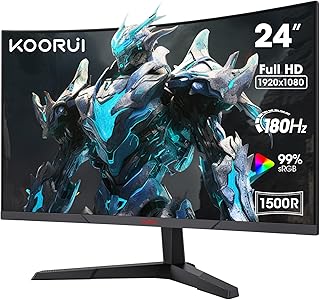
KOORUI 24 Inch Gaming Monitor -FHD 1080P Curved Monitor
Why We Love It

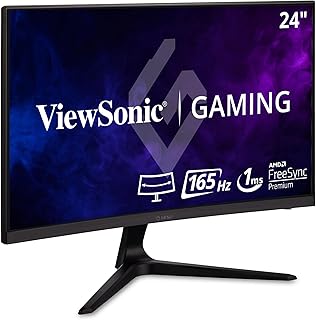
Viewsonic Omni VX2418C 24 Inch 1080p 1ms 165Hz Curved Gaming
Why We Love It

FeuVision 27 inch Curved Gaming Monitor 240Hz
Why We Love It

27 Inch Curved Gaming Monitor
Why We Love It

KTC 32 inch 240Hz Curved Gaming Monitor 1500R 1080P 125%
Why We Love It

Samsung LS24D360GAUXXU 24" Curved FullHD 100Hz 1080p Monitor
Why We Love It

KOORUI 24 Inch Curved Monitor
Why We Love It
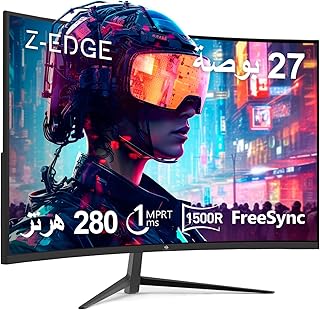
Z-Edge 27-inch Curved Gaming Monitor 16:9 1920x1080 280Hz
Why We Love It

Z-EDGE 27-inch Curved Gaming Monitor
Why We Love It

Gawfolk 27 inch Curved Gaming Monitor 180Hz FHD(1920x1080)
Why We Love It
Quick Pick
10 Best 1080p Curved Computer Monitor Of 2026
Quick Pick
KOORUI 24 Inch Gaming Monitor -FHD 1080P Curved Monitor 165Hz VA 1ms 1500R PC Monitors with Adaptive Sync, HDMI X2 /DP, VESA Compatible, Tilt Adjustable, Eye Care
Viewsonic Omni VX2418C 24 Inch 1080p 1ms 165Hz Curved Gaming Monitor with AMD FreeSync Premium, Eye Care, HDMI and DisplayPort
FeuVision 27 inch Curved Gaming Monitor 240Hz, FHD 1080p, VA Panel, 0.5ms Response Time, Adaptive sync, PC Computer Monitor, 3-Sided Frameless, Ultra Slim, 100% sRGB, Bluelight Filter, DP, HDMI
27 Inch Curved Gaming Monitor,180Hz, VA Display, QHD 1440P Computer Monitor, 1ms, HDR10,90% DCI-P3, Adaptive Sync, VESA Compatible,Tilt Adjustable
KTC 32 inch 240Hz Curved Gaming Monitor 1500R 1080P 125% sRGB 1ms | Freesync/G-sync HDR10,HDMI/DP/USB Ports VESA,Tilt Adjustable,Xbox PS5 Switch,Black
Samsung LS24D360GAUXXU 24" Curved FullHD 100Hz 1080p Monitor - 1920x1080, HDMI, VGA
KOORUI 24 Inch Curved Monitor, Gaming 100Hz, 1500R, FHD 1080P, VA, Eye Care | Computer Monitors, HDMI, VGA, Tilt Adjustment, Black
Z-Edge 27-inch Curved Gaming Monitor 16:9 1920x1080 280Hz 1ms Frameless LED Gaming Monitor, UG27P AMD Freesync Premium Display Port HDMI
Z-EDGE 27-inch Curved Gaming Monitor - 16:9 Full HD 1920x1080, 300Hz Refresh Rate, 1ms Response Time, Frameless LED Display, AMD FreeSync Premium - DisplayPort & HDMI Ports UG27H White | MPRT 1ms/3000:1 Contrast Ratio/HDR/VESA/16.7 Million Colors/HDMI 2.0 x 2 / DP x 2 / Audio x 1
Gawfolk 27 inch Curved Gaming Monitor 180Hz FHD(1920x1080) 1800R | 1080P Computer Monitors Fast 1ms(GTG) 100%sRGB FreeSync Suitable for home office and e-sports games Display Screen
Buying Guide: 1080p Curved Computer Monitor
📋 Table of Contents
1What resolution and curvature should I look for in a 1080p curved monitor?
A 1080p curved monitor typically has a 1920x1080 resolution with a curvature of 1800R to 2200R. This curvature enhances immersion and reduces eye strain by keeping the screen closer to your natural field of view, but ensure the size (24-27 inches) matches your desk space and viewing distance.
2Does a curved monitor offer better ergonomics than a flat one?
Yes, curved monitors can provide a more immersive experience and reduce the need to move your head side to side. However, they may not be ideal for multi-tasking or split-screen work, where flat monitors often offer a wider, more uniform viewing angle across multiple windows.
3What refresh rate and response time are important for a 1080p curved monitor?
For general use, a 60Hz refresh rate and 5ms response time are sufficient. If you're gaming or working with fast-moving visuals, look for at least 75Hz and 1ms response time to avoid motion blur and ensure smooth performance.
4Are there specific connectivity options I should prioritize?
Look for at least two HDMI ports and a DisplayPort for versatility, especially if you're connecting multiple devices like a PC, console, or external GPU. USB-C with power delivery is also a plus for docking stations and charging peripherals.
5What are common mistakes to avoid when buying a 1080p curved monitor?
Avoid overly large screens (over 32 inches) if your desk space is limited, and don't ignore the stand's adjustability. A monitor with height, tilt, and swivel adjustments ensures better posture and comfort during long work sessions.
How we choose
Our editors are people who genuinely love testing and writing about products. We compare each product's real-world usability and strengths, then distill what matters most into our own "Why We Love It" points — so you get an honest, at-a-glance sense of what counts before you buy.