10 Best 100mm Monitor Arms Of 2026
100mm Monitor Arms — Reviews, Recommendations & Updated Buying Guide November 2026


ErGear Single Monitor Arm
Why We Love It


MOUNTUP Single Monitor Desk Mount Holds Screen up to 32 inch
Why We Love It

Single Monitor Mount for 13-32 inch Screen
Why We Love It
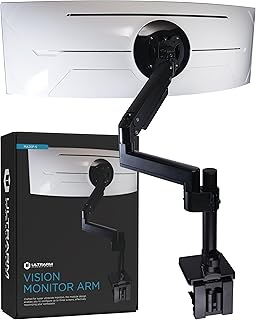
ULTRARM Heavy Duty Monitor Arm for Ultrawide Monitors up to
Why We Love It
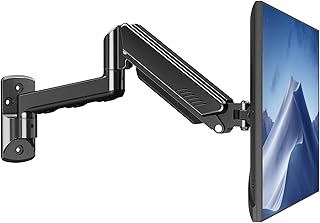
MOUNTUP Single Monitor Wall Mount for Max 32 Inch Computer
Why We Love It

PUTORSEN Monitor Arm Wall Mount Bracket for 17-42 inch
Why We Love It

HUANUO FlowLift™ Dual Monitor Stand
Why We Love It

ErGear Dual Monitor Arm
Why We Love It

HUANUO Single Monitor Arm Desk Mount for 13 to 32 inch
Why We Love It

Essentials 360® Computer Monitor Arm with Gas Spring Monitor
Why We Love It
Quick Pick
10 Best 100mm Monitor Arms Of 2026
Quick Pick
ErGear Single Monitor Arm, Fully Adjustable Monitor Mount for 13–34 Inch Screens, Fast Install Computer Stand with Tool-Free VESA Mount, Cable Management, Holds 9kg, Max VESA 100x100mm
MOUNTUP Single Monitor Desk Mount Holds Screen up to 32 inch, Height Adjustable Monitor Arm, Computer Monitors Stand with Clamp/Grommet Base, VESA Mounts Fit 2-9kg Computer, Black, MU0004
Single Monitor Mount for 13-32 inch Screen, Spring Arm, Gaming & Home Office Use, VESA 75x75mm & 100x100mm, Freelift Pro White
ULTRARM Heavy Duty Monitor Arm for Ultrawide Monitors up to 57" and 20 KGS, Single Desk Stand, Pneumatic Height Adjustable, Modular Extension Arms - Max VESA 100x100, Black, MA20P-S | Max 57", 44 lb, 900R Screens, VESA 100x100, Upgradable, Pneumatic Height Adjustable, C-clamp & Grommet Mount, Black, MA20P-S
MOUNTUP Single Monitor Wall Mount for Max 32 Inch Computer Screen, Fully Adjustable Gas Spring Monitor Arm, Wall Mounted Monitor Holder Support 2.2-17.6lbs Display, VESA Bracket Fit 75x75mm, 100x100mm
PUTORSEN Monitor Arm Wall Mount Bracket for 17-42 inch Screens, Height Adjustable Gas Spring Single Wall Monitor Mount, Tilt Swivel Rotate, Load 12KG, VESA 75x75/100x100mm, Black
HUANUO FlowLift™ Dual Monitor Stand, Fully Adjustable Gaming Monitor Desk Mount for 13–32″ Computer Screens, Full Motion VESA 75x75/100x100 with C-Clamp & Grommet Base, Each Arm Holds 4.4 to 19.8 lbs
ErGear Dual Monitor Arm, Full Adjustable Monitor Mount for 13–32″ Screens, Fast Install Computer Monitor Stand with Tool-Free VESA Mount, Max Load 19.8 lbs, Max VESA 100x100mm
HUANUO Single Monitor Arm Desk Mount for 13 to 32 inch Screens, Tool Free Height Adjustable Monitor Stand with Tilt Swivel Rotate, 75 & 100mm VESA Mount, Load 9kg, C-clamp & Grommet Options
Essentials 360® Computer Monitor Arm with Gas Spring Monitor Mount Desk Mount Tilt Angle for 10-32 Inch Adjustable Height Load Capacity 10kg VESA 75x75/100x100mm with Grommet And C-Clamp Mounting
Buying Guide: 100mm Monitor Arms
📋 Table of Contents
1What weight capacity should I look for in a 100mm monitor arm?
Look for a weight capacity of at least 2.5kg to 3kg for most desktop setups. This range supports typical monitors, tablets, or small displays without sagging or wobbling, ensuring stability during use.
2What materials are best for durability and adjustability?
High-quality steel or aluminum arms offer the best balance of strength and adjustability. Avoid plastic arms unless they are reinforced with metal joints, as they may bend or break under pressure over time.
3How does the 100mm diameter affect compatibility with monitors?
A 100mm diameter arm is designed to fit standard monitor stands or VESA mounts with 100mm holes. Ensure your monitor or stand has matching mounting holes to avoid compatibility issues and secure installation.
4What kind of movement range is ideal for ergonomic use?
Look for arms with at least 180-degree horizontal rotation and 90-degree vertical tilt. This range allows for flexible positioning, reducing strain on your neck and shoulders during long work sessions.
5Are there any common mistakes to avoid when buying a 100mm monitor arm?
Avoid arms with overly tight or stiff joints, as they can be difficult to adjust. Also, ensure the arm includes all necessary mounting hardware, as missing screws or brackets can delay setup and compromise stability.
How we choose
Our editors are people who genuinely love testing and writing about products. We compare each product's real-world usability and strengths, then distill what matters most into our own "Why We Love It" points — so you get an honest, at-a-glance sense of what counts before you buy.