10 Best 1 In 4 Out Splitters Of 2026
1 In 4 Out Splitters — Reviews, Recommendations & Updated Buying Guide November 2026


MT-ViKI HDMI Splitter 1 in 4 Out
Why We Love It


HDMI Splitter 1 in 4 out
Why We Love It

MT-VIKI 4K HDMI Splitter 1 in 2 Out
Why We Love It

Avedio links HDMI Splitter 1 In 2 Out
Why We Love It

OREI 4K 1x4 HDMI Splitter by
Why We Love It

HDMI Splitter 1 in 4 Out Ultra HD 4K 30Hz 4 Port
Why We Love It
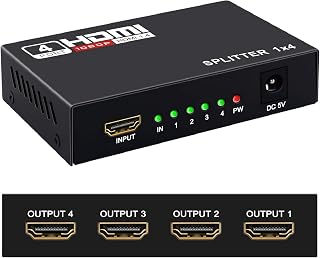
HDMI Splitter 1 in 4 Out -4K Hdmi Splitter 1x4 Ports v1.4
Why We Love It

HDMI Splitter
Why We Love It

4K HDMI Splitter 1 in 4 Out
Why We Love It

Yinker 4K HDMI Splitter 1 in 4 Out w/1.5m HDMI Cable
Why We Love It
Quick Pick
10 Best 1 In 4 Out Splitters Of 2026
Quick Pick
MT-ViKI HDMI Splitter 1 in 4 Out, 1x4 Power HDMI Splitter 4 Ports w/AC Adapter Austrila Standard, 4Kx2K@30Hz 3D Full HD Distributor for PS4 Fire Stick HDTV
HDMI Splitter 1 in 4 out, 4K Splitter for 4 Monitors, 4 Way Distribution, Multi HDMI Adapter for PC, Laptop, HDTV, Projector, Xbox, 1 Input 4 Outputs, Mirror Only, Not Extend
MT-VIKI 4K HDMI Splitter 1 in 2 Out, 1x2 Powered HDMI Splitter for Dual Monitors w/Power Adapter, 4K@30Hz Dual Monitors Mirror for PS4 Fire Stick HDTV
avedio links HDMI Splitter 1 In 2 Out, 4K HDMI Splitter for Dual Monitors【Just Mirror, Not Extend】 2 Way Splitter Amplifier for 4K@30HZ Full HD 1080P 3D with HDMI Cable
OREI 4K 1x4 HDMI Splitter by - 1 Port to 4 HDMI Display Duplicate/Mirror - Powered Splitter Ver 1.4 Certified for Full HD 1080P High Resolution & 3D Support (One Input To Four Outputs) - HD-104 Black
HDMI Splitter 1 in 4 Out Ultra HD 4K 30Hz 4 Port Distribution Hub for Monitors HDTV Projector, Mirror Mode Only for PS5 Xbox PC Laptop
HDMI Splitter 1 in 4 Out -4K Hdmi Splitter 1x4 Ports v1.4 Powered 4K/2K Full Ultra HD 1080p US Adapter 3D Support
HDMI Splitter, 1 in 4 Out 4K HDMI Splitters for Dual Monitors, Supports 3D Full HD 1080P Aluminum HDMI Spliter, HDMI Adapter for TV Compatible for PS4 Fire Stick HDTV (1 Source to 4 Displays) Black
4K HDMI Splitter 1 in 4 Out, 4K@30Hz 1x4 Slim HDMI Splitter for Multiple Monitors, 1 to 4 USB Powered Only Duplicate/Mirror for PS4 Fire Stick HDTV
Yinker 4K HDMI Splitter 1 in 4 Out w/1.5m HDMI Cable, USB-C Powered, 4K@30Hz Simultaneous Mirror to 4 Monitors (No Extension), HDCP 1.4 EDID 3D, for PS5 Xbox PC HDTV, Type-C Power Cable Included
Buying Guide: 1 In 4 Out Splitters
📋 Table of Contents
1What port types should I look for in a 1 in 4 out splitter?
Most 1 in 4 out splitters use HDMI or DisplayPort inputs and outputs. HDMI is more common for home and office use, while DisplayPort is preferred for high-refresh-rate gaming or professional monitors. Ensure all ports match your connected devices' requirements for compatibility and performance.
2Does signal quality drop when using a 1 in 4 out splitter?
Signal degradation is minimal in high-quality splitters, especially for HDMI 2.0 or DisplayPort 1.4 models. However, lower-end splitters may cause lag, reduced resolution, or color distortion. Look for splitters with active signal boosting or EDID management for stable, high-fidelity output across all four displays.
3Can I use a 1 in 4 out splitter for gaming or 4K video?
Yes, but only if the splitter supports at least 4K@60Hz and has a bandwidth of 18 Gbps or higher. Splitters with HDCP 2.2 compliance are essential for 4K content from streaming services or Blu-ray. Avoid passive splitters for gaming, as they may introduce input lag and affect responsiveness.
4Do I need an external power source for a 1 in 4 out splitter?
Many splitters require external power, especially those handling 4K or multiple high-resolution displays. Powered splitters maintain signal strength and reduce overheating. If your splitter doesn’t have a power adapter, check if your source device can supply enough power through the input port — this is rare for 4-output models.
5What are common mistakes to avoid when buying a 1 in 4 out splitter?
Avoid splitters that don’t specify resolution and refresh rate support, as they may not work with your setup. Also, don’t assume all HDMI splitters are the same — some only mirror the same content to all outputs, while others allow independent display configurations. Always check if it supports your source device and display requirements before purchasing.
How we choose
Our editors are people who genuinely love testing and writing about products. We compare each product's real-world usability and strengths, then distill what matters most into our own "Why We Love It" points — so you get an honest, at-a-glance sense of what counts before you buy.