10 Best 1 In 2 Out Splitters Of 2026
1 In 2 Out Splitters — Reviews, Recommendations & Updated Buying Guide November 2026


Avedio links HDMI Splitter 1 In 2 Out
Why We Love It


MT-VIKI 4K HDMI Splitter 1 in 2 Out
Why We Love It

OREI HDMI Splitter 1 in 2 Out - for TV Mirror Only
Why We Love It

Cablecc HDMI Male to 2 HDMI Female 1 In 2 Out Splitter Cable
Why We Love It
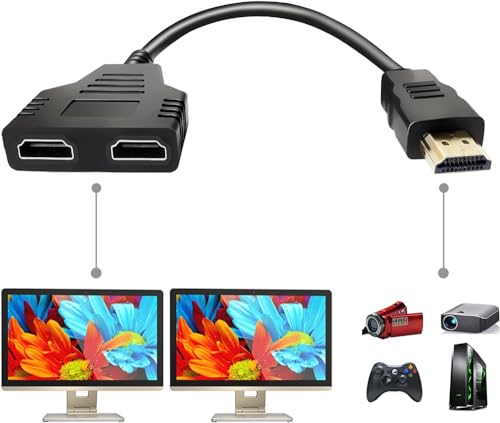
YARDHOBI HDMI Splitter Adapter Cable
Why We Love It

4K HDMI Splitter 1 in 2 Out (Mirror Only) – HDMI 2.0 4K@60Hz
Why We Love It

OREI UltraHD 4K @ 60 Hz 1 X 2 HDMI Splitter 1 in 2 Out 2
Why We Love It

HDMI Splitter 1 in 2 Out 4K@30Hz [w/ 5ft HDMI Cable]
Why We Love It

Wisfunlly 4K HDMI Splitter 1 in 2 Out
Why We Love It
Quick Pick
10 Best 1 In 2 Out Splitters Of 2026
Quick Pick
avedio links HDMI Splitter 1 In 2 Out, 4K HDMI Splitter for Dual Monitors【Just Mirror, Not Extend】 2 Way Splitter Amplifier for 4K@30HZ Full HD 1080P 3D with HDMI Cable
MT-VIKI 4K HDMI Splitter 1 in 2 Out, 1x2 Powered HDMI Splitter for Dual Monitors w/Power Adapter, 4K@30Hz Dual Monitors Mirror for PS4 Fire Stick HDTV
OREI HDMI Splitter 1 in 2 Out - for TV Mirror Only - Up to 4K@30Hz | Not for Multi Monitors, No HDCP bypass, USB Powered, No Adapter Included,1080P@60Hz & 4K@30Hz Resolutions HDMI Splitter
Cablecc HDMI Male to 2 HDMI Female 1 In 2 Out Splitter Cable Adapter Converter
YARDHOBI HDMI Splitter Adapter Cable, 1 in 2 Out HDMI Male to Dual HDMI Female, HDMI Cable Splitter for HD, LED, LCD TVs, Support Two Same TVs at Same Time 1080P
4K HDMI Splitter 1 in 2 Out (Mirror Only) – HDMI 2.0 4K@60Hz, 1080p@240Hz | Auto Downscaling, 18Gbps, HDCP 2.2, Smart Power Detection, Duplicate Screens for Dual Monitors for TV, Monitor, PS5, Xbox
OREI UltraHD 4K @ 60 Hz 1 X 2 HDMI Splitter 1 in 2 Out 2 Port 2: 8-Bit - HDMI 2.0, HDCP 2.0, 18 Gbps, EDID, Duplicate/Mirror 4K Screens - UHDS-102 | 4:4:4 8-bit - Does Not Bypass HDCP, 18 Gbps, 4K HDMI Splitter. HDCP 2.3 & DVI 1.0 compliant. PCM, Dolby TrueHD, audio support
HDMI Splitter 1 in 2 Out 4K@30Hz [w/ 5ft HDMI Cable], USB-C Powered, Simultaneous Mirror to 2 Monitors (No Extension), HDCP 1.4 EDID 3D, for PS5 Xbox PC HDTV(Metal Shell)
Wisfunlly 4K HDMI Splitter 1 in 2 Out, 4K 30Hz, HDMI 2.0 Cable Male to Dual Female with Power USB Cable for HD LED LCD TV, Supports Dual Monitors Duplicated-Mirror
Buying Guide: 1 In 2 Out Splitters
📋 Table of Contents
1What port types should I look for in a 1 in 2 out splitter?
Most splitters use USB-A or USB-C ports, so match the input port to your device. For example, a USB-C to dual USB-A splitter is common for charging or data transfer, while a USB-C to dual USB-C splitter is ideal for high-speed data or power delivery between modern devices.
2Does the splitter support fast charging or data transfer?
Look for splitters with USB 3.0 or higher for data speeds up to 5 Gbps, and USB Power Delivery (PD) support for fast charging (up to 100W). Not all splitters support these features, so check the product specs or packaging for confirmation.
3Can I use a 1 in 2 out splitter for both charging and data transfer at the same time?
It depends on the splitter’s design. Some models allow simultaneous charging and data transfer, while others may only support one function at a time. Always check the manufacturer’s description to confirm dual functionality before purchasing.
4What cable length is best for a 1 in 2 out splitter?
A 1-meter cable is typically sufficient for most use cases, like connecting a laptop to a power bank and a phone. Longer cables (2 meters or more) offer more flexibility but may introduce signal loss if not high quality, so prioritize well-rated cables for longer lengths.
5Are there any common mistakes to avoid when buying a 1 in 2 out splitter?
Avoid splitters that don’t specify power or data support, as they may underperform. Also, don’t assume all USB-C splitters are the same — some only support charging, not data. Always read reviews and check compatibility with your devices before buying.
How we choose
Our editors are people who genuinely love testing and writing about products. We compare each product's real-world usability and strengths, then distill what matters most into our own "Why We Love It" points — so you get an honest, at-a-glance sense of what counts before you buy.